

A patch panel is a rack-mounted termination and patching assembly; a keystone jack is a connector module that can fit into a compatible outlet or unloaded patch panel. They are not mutually exclusive alternatives. Choose the rack or outlet layout first, then specify the termination modules and supporting cable management.
| Option | What you specify | Planning priority |
|---|---|---|
| Loaded patch panel | A panel supplied with its connection hardware. | Port count, category, rear access and the fixed termination arrangement. |
| Unloaded panel with keystone jacks | A compatible panel and the required modules as a matched BOM. | Module dimensions, shielding, port density and future replacement. |
| Distributed keystone outlets | Termination modules in compatible faceplates or enclosures. | Endpoint location, cable routing, labelling and access. |
Browse loaded and unloaded patch panels and keystone jack options. If the actual question is how to join two terminated leads, read RJ45 coupler vs keystone jack.
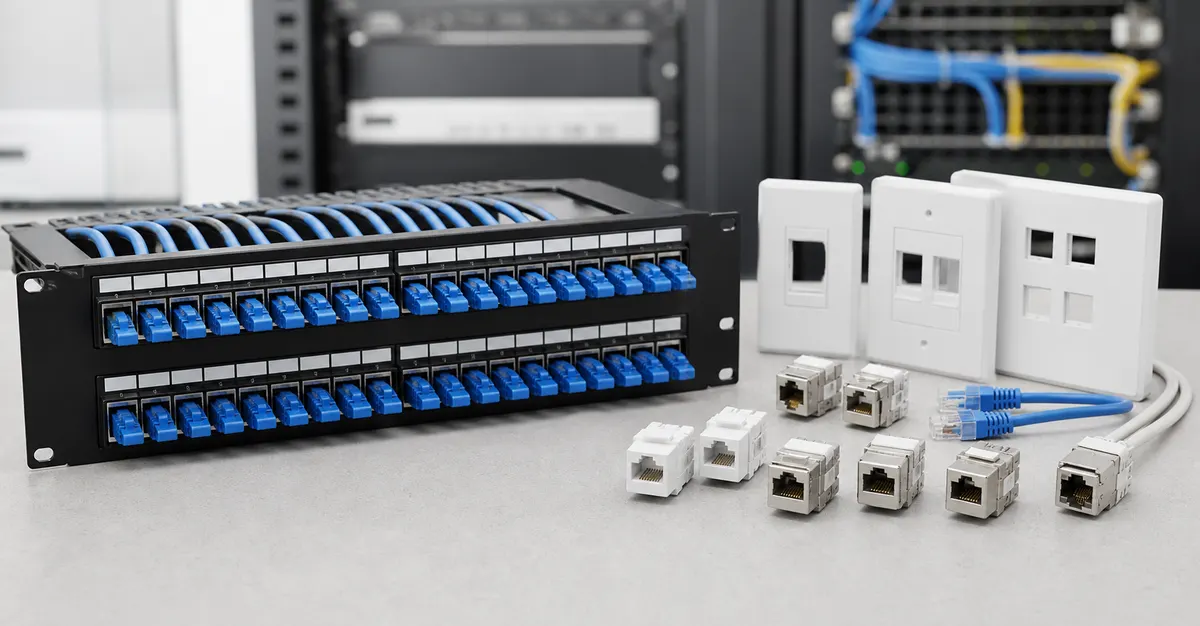
The question “patch panel or keystone jack?” is often answered with a unit-price comparison. That misses the larger cost: how the system will be installed, labeled, changed, repaired and expanded over several years.
A better decision starts with serviceability. This guide compares fixed panels, modular keystone panels and distributed jack-based outlets through the work a technician will actually perform.
First separate the three architectures
- Fixed-port patch panel: ports and termination structure are integrated into a rack unit.
- Modular keystone panel: individual jacks are installed into a rack panel or carrier.
- Distributed keystone outlets: individual jacks appear in faceplates, floor boxes, consolidation points or equipment-area housings.
These are not always competing choices. A project may use modular jacks in both the rack and work area, or a fixed rack panel with individual outlet jacks. The task is to select the interfaces that match deployment and maintenance.
The serviceability decision matrix
| Decision factor | Fixed panel tends to favor | Modular keystone tends to favor |
|---|---|---|
| Port density | Consistent high-density rack layouts | Flexible population and mixed media |
| Failure isolation | Panel-level workflow | Port-by-port replacement |
| Phased deployment | Full rack rows installed together | Add modules as areas become ready |
| Mixed categories | Standardized family | Different approved modules in one carrier |
| Spares | Panel or compatible termination parts | Individual matching jacks and carriers |
| Training | One repeated panel process | One repeated jack process across locations |
Six questions that reveal the better fit
1. How many ports change each month?
A stable installation and a frequently reconfigured lab may need different architectures even at the same port count. Estimate moves, adds and changes. A modular design can simplify port-level replacement, while a consistent panel format can make large stable rows easier to manage.
2. Is the project single-category or mixed?
If every run uses the same approved construction, a fixed family can be efficient. If the rack mixes shielded and unshielded copper, colors, or phased media, a modular carrier may give the project more controlled flexibility. Review the available keystone jack families before assuming every module fits every carrier or cable.
3. Where can a technician work safely?
Check front and rear access, rack depth, cable slack, lighting and the ability to remove one termination without disturbing adjacent links. A theoretically replaceable module provides little benefit if it cannot be reached in the installed rack.
4. What is the spare strategy?
Define which items are expected to fail, be damaged or be changed. Keep spares by approved configuration rather than generic category. A spare jack still needs the correct cable fit, shielding and termination method. Include labels and small installation accessories, not only the visible connector.
5. How will patch cords be routed?
Port architecture and cable management are one decision. High density without horizontal and vertical routing space produces crossing cords, blocked labels and difficult service loops. Use the cable management range to reserve routing capacity while the rack elevation is still editable.
6. What will the acceptance sample represent?
Build a representative rack segment: panel or carrier, actual jack, horizontal cable, patch cords and manager. Confirm installation time, labeling, bend radius, shield interfaces where applicable and access for a simulated replacement.
A change-rate zoning idea
Instead of choosing one architecture for the whole building, group spaces by expected change rate:
- Low-change backbone areas: prioritize consistency and density.
- Medium-change offices: balance standardization with replaceable work-area modules.
- High-change labs or staging areas: prioritize accessible modularity, clear labels and generous routing.
This makes the design respond to operations instead of forcing every zone into one hardware preference.
What to place in the RFQ
- Rack unit and depth limits.
- Port counts now and at planned expansion.
- Cable category, construction and outside diameter.
- Shielding and bonding architecture.
- Expected moves, adds and changes.
- Labeling and color rules.
- Required spare ratio and replacement workflow.
- Representative sample rack segment and acceptance checks.
Estimate service cost, not only hardware cost
For each architecture, model a small maintenance scenario: add four ports, replace one damaged termination and relabel one department. Record the technician time, rack access, parts disturbed and spares consumed. This does not need to be a perfect financial model. Its purpose is to reveal whether a lower initial component price creates a more expensive or disruptive service process.
Also ask who owns the spare inventory and how an approved replacement is identified five years later. A modular design may reduce the size of a replacement part, but only if the matching jack, carrier and termination instruction remain controlled. A fixed panel may simplify standardization, but the project should define the recovery plan if one port or termination area is damaged.
Frequently asked questions
Is a patch panel always better for high port counts?
A rack panel usually organizes high port density efficiently, but the best choice still depends on termination style, rack space, modular replacement, labeling and how often the installation changes.
When are modular keystone panels useful?
They are useful when projects mix categories or media, need port-by-port replacement, phase installations over time or want a common jack format across racks and outlets.
What spare parts should a project keep?
Keep spares that match the actual failure and change model: replacement jacks or modules, patch cords, labels, termination accessories and any proprietary panel hardware used in the approved build.
Plan the rack around real service work
Review DetwilerTech keystone jacks, cable management components and the wider product catalogue. Then send the rack elevation, port count and cable specification for a focused configuration review.

CUSTOMER DISCUSSION
Article Discussion
Read questions and experience from other customers, then add your own product or project feedback.
No published comments yet. Start the first useful discussion.
Sign in to comment
Registered customers use their account display name and can track moderation status from the account page.
Customer Login Create an Account